
Game
The game module provides various game-related functions. After reading the part related to your game engine on the JOGOS_SDK Introduction page, you can use the relevant functions as follows:
window.JOGOS_SDK.game;If you need to complete configuration operations such as localization language adaptation, device adaptation, and time calibration during the initialization phase, you can jump to the Initialization (SysInfo) related page to view detailed parameter definitions and configuration methods.
Game Pause/Resume
When the game is interrupted (such as ending a level, pausing the game, etc.), you must call the game pause method to inform us that the game has been paused. Do not forget to call the resume game method to inform us that the game has resumed when the game is restored or continued (such as resuming, reviving, entering the next level, etc.). The SDK will automatically handle the pause and resume when playing ads, so there is no need to call these methods repeatedly.
// Inform us that the game has been paused
await window.JOGOS_SDK.game.pause();
// Inform us that the paused game has resumed
await window.JOGOS_SDK.game.continuePlay();
Game Start/End Loading
When your game starts loading, you must call the start loading method to inform us that the game has started loading. After the loading is completed, be sure to call the end loading method to inform us that the game has finished loading.
// Inform us that the game has started loading
await window.JOGOS_SDK.game.loadingStart();
// Inform us that the game loading has ended
await window.JOGOS_SDK.game.loadingEnd();
When the game starts loading, you must call the start loading method to inform us that the game has started loading. After the loading is completed, you must call the end loading method to inform us that the game has finished loading.
// Inform us that the game has been paused
await window.JOGOS_SDK.game.pause();
// Inform us that the game has resumed
await window.JOGOS_SDK.game.continuePlay();
Happy Time
This method can be called when the player achieves a certain accomplishment (such as defeating a Boss, achieving a high score, etc.). A successful call to this method will trigger celebration actions on the website (such as launching some confetti). There is no need to call this method when completing a level or receiving a reward.
// Activate game happy time
await window.JOGOS_SDK.game.happytime();
Friend and Chat Features
We have integrated standardized social feature modules, covering friend relationship management and real-time chat services. If your game supports multiplayer interaction gameplay, you can quickly integrate these features through lightweight APIs to implement core social scenarios such as: cloud-synchronized friend lists, one-click team invites, and private conversations. This helps developers efficiently build an immersive in-game social ecosystem with minimal development cost.
- When using these features, developers need to pass the corresponding player's UserId from the platform side as a parameter.
Check Friend Relationship
Checks if a specified player is a friend of the current user.
/**
 * Checks if specified players are my friends
 * @param {Array<number>} userIds Collection of player IDs
 * @returns {Promise<Object>} { [userId: number]: boolean } Key-value pair object
 */
window.JOGOS_SDK.game.isMyFriends = async function(userIds) {
    // Internal implementation
}
Friend Interaction Logic Explanation
Developers need to implement the button display logic based on friend relationships:
- Button Status Check: Use the
isMyFriendsinterface to check if a specified player is a friend. - Button Display Logic:
- If they are a friend: Display a "Conversation" button. When clicked, call
openChatDialogto initiate a chat. - If they are not a friend: Display an "Add Friend" button. When clicked, call
sendFriendRequestto send a friend request.
- If they are a friend: Display a "Conversation" button. When clicked, call
- Button Implementation: The button's UI style, position, and interaction effects must be implemented by the game developer.
Example Code
// Example implementation of a friend interaction button
async function setupFriendButton(userId, buttonElement) {
    try {
        // 1. Check friend relationship
        const friendStatus = await window.JOGOS_SDK.game.isMyFriends([userId]);
        const isFriend = friendStatus[userId];

        // 2. Set button based on friend relationship
        if (isFriend) {
            // Display chat button
            buttonElement.textContent = "Conversation";
            buttonElement.onclick = async () => {
                const success = await window.JOGOS_SDK.game.openChatDialog(userId);
                if (!success) {
                    alert("Unable to open chat window. Please ensure you are in the official platform environment.");
                }
            };
        } else {
            // Display add friend button
            buttonElement.textContent = "Add Friend";
            buttonElement.onclick = async () => {
                const success = await window.JOGOS_SDK.game.sendFriendRequest(userId);
                if (success) {
                    alert("Friend request sent.");
                } else {
                    alert("Failed to send friend request.");
                }
            };
        }

        // 3. Add logic to prevent rapid clicking
        let lastClickTime = 0;
        const originalClick = buttonElement.onclick;
        buttonElement.onclick = function() {
            const now = Date.now();
            if (now - lastClickTime < 3000) {
                console.log("Clicks are too frequent. Please try again later.");
                return;
            }
            lastClickTime = now;
            originalClick.call(this);
        };

    } catch (error) {
        console.error("Failed to set up friend button:", error);
    }
}
Add Friend
Sends a friend request to a specified player.
/**
 * Sends a friend request to a specified player
 * @param {number} userId Target player ID
 * @returns {Promise<boolean>} Whether the request was sent successfully
 */
window.JOGOS_SDK.game.sendFriendRequest = async function(userId) {
    // Internal implementation
}
Initiate Chat
Opens the chat window with a specified friend.
/**
 * Opens the chat window with a specified player
 * @param {number} userId Target player ID
 * @returns {Promise<boolean>} Whether it was opened successfully
 */
window.JOGOS_SDK.game.openChatDialog = async function(userId) {
    // Internal implementation
}
Edge Cases:
- Returns failure and displays a prompt when not embedded in the official platform: "Friend chat feature is only available on the official platform."
- Button cannot be clicked repeatedly within 3 seconds of a previous click.
Initialization Interface Returns Invitation Field Parameters
- The game initialization interface now includes custom parameters for inviting others to join the game, such as room ID, invitation code, etc. Developers can include these parameters when sharing invitation links. When an invited player enters the game via the link, the SDK will pass the parameters to the developer to pull the player into the corresponding room.
// Passing room parameters during game initialization (Example)
const gameConfig = {
    inviteArgs: 'ABC123',       // Custom field (e.g., invitation code/room ID)
    // Other game configurations...
};

// Pass parameters when initializing the SDK
window.JOGOS_SDK.init({
    gameId: 'your_game_id',
    customParams: JSON.stringify(gameConfig)
});
Open Invite Friends Window
- When a user is in a position within the game where a new game can be joined, this feature allows you to place an "Invite & Share" button in the game scene.
- Clicking the button opens a popup containing an invitation link, supporting the selection of friends to send the invitation to.
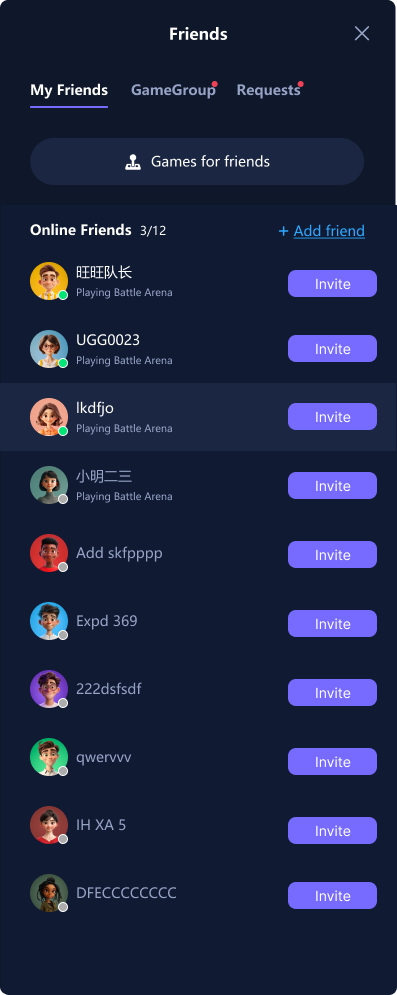
- The invitation link carries custom parameters (such as room ID/invitation code, etc.). When the invited player clicks the link and enters the game, the developer can parse these parameters to pull the player into the corresponding room.
- Clicking the "Invite friend" button in the game scene opens a sidebar friend list panel to send invitation messages to friends, supporting joining the game via link or direct invitation.
/**
 * Opens the invitation window
 * @param {Object} inviteArgs Invitation parameters object
 * @param {string} inviteArgs.inviteArgs Custom invitation parameter (Required, e.g., room ID or invitation code)
 * @param {string} [inviteArgs.customData] Custom data (will be passed through to the invitee)
 * @param {number} [inviteArgs.expireTime] Invitation link expiration timestamp (milliseconds)
 */
window.JOGOS_SDK.game.openInviteDialog = function(inviteArgs) {
    // Parameter validation
    if (!inviteArgs || !inviteArgs.inviteArgs) {
        throw new Error('Missing required parameter: inviteArgs');
    }

    // Internal implementation:
    // 1. Generate invitation link with parameters
    // 2. Open invitation popup (including friend list and share options)
    // 3. Handle invitation result callbacks
};